
In This Post I Am Going To Show You How To Install Curl In Termux And How Can We Use Curl To Download Files Directly From The Server Using Different Protocols Like HTTP, FTP Etc. We Will Start With The Basic Definition Of Curl In Termux Then We Will See How Can We Install Curl In Termux Using A Simple Command And After That We Will See The Uses Of Curl In Termux. A List Of Essential Packages Will Be Also Provided In This Post And All The Common Errors Are Fixed In A Section To Do A Safer And Smooth Installation Of Curl In Termux. So Without Wasting Much Of The Time Lets Start,
What Is Curl?
Curl Is An Open Source Command Line Utility Tool That Lets You Transfer Data To And From A Server Using Urls, Supporting Protocols Like HTTP, HTTPS And FTP. Its More Likely A Tool Like Wget But Now This Time It Comes With Protocols. In Most Of The Cases It Is Used To Test Apis And Check Whether A Server Is Responding To A Request Or Not. It Is Used To Download Files Also In Termux. It Gives Full Control Over Authentication Which Is Not Available In Wget.
How To Install Curl In Termux?
We Can Install Curl In Termux Using The Same Method Which We Used In Wget But This Time We Will Use A Separate Command For Installation Of Curl In Termux. We Will Need An Active Internet Connection And Device With A Working Termux Or We Can Say An Updated Termux. We Will Run A Script To Update All The Termux Packages Then We Will Install Curl In Termux And After That We Will Verify The Installation Of Curl. Follow The Below Steps One By One To Install Curl In Termux:
Step 1: The Universal First Step Will Be Always To Update And Upgrade Termux Packages Using pkg update && pkg upgrade -y Command.
pkg update && pkg upgrade -yStep 2: Once The Updation Of Termux Packages Has Been Done Without Any Error We Will Move To The Next Step Of Installation Curl In Termux. Now Type pkg install curl -y Command To Install Curl In Termux.
pkg install curl -y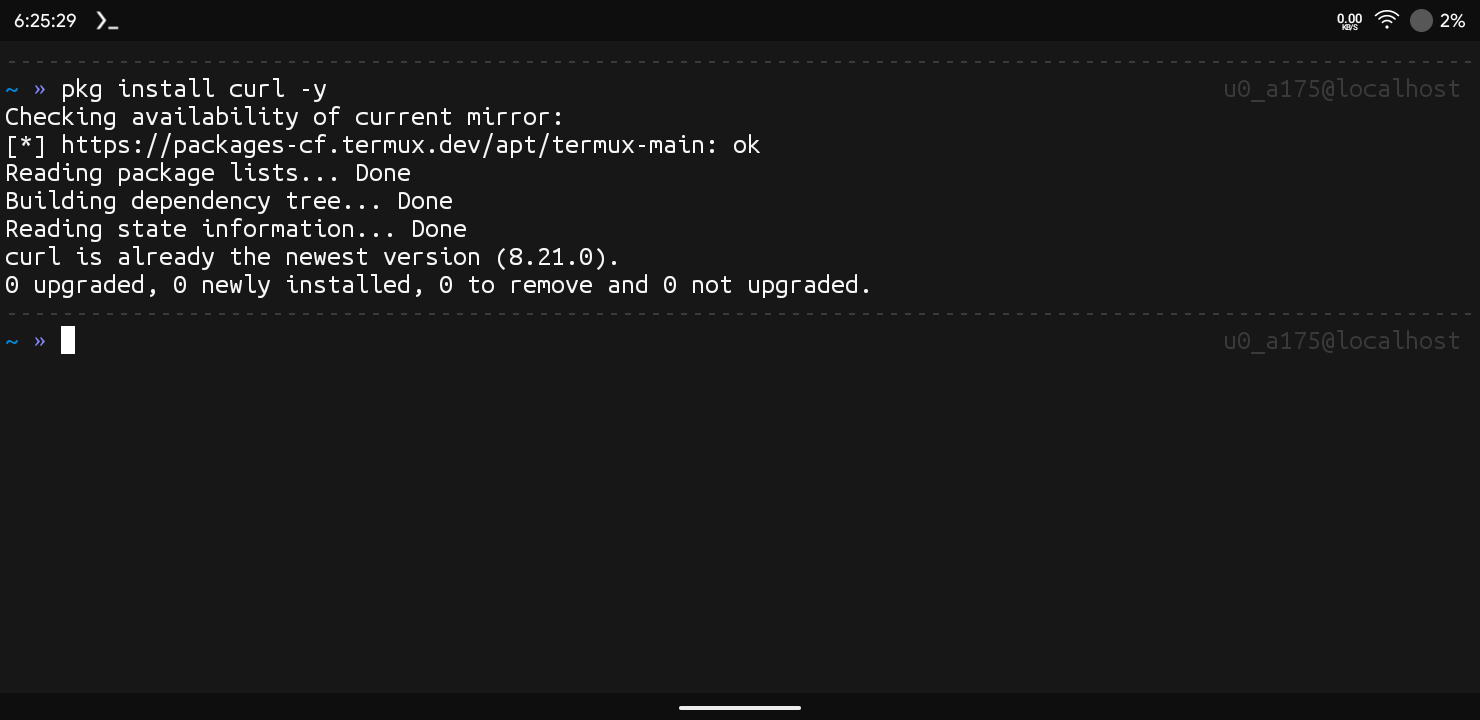
Step 3: Once The Curl Has Been Installed In Termux With A Success Message We Can Re Verify The Installation Of The Curl In Termux Using curl --version Command. This Shows The Current Version Of Curl In Termux.
curl --versionThrough These Basic Yet Powerful Commands We Can Install Curl In Termux Without Any Error. Make Sure To Connect With The Device While Installing The Curl In Termux. After The Installation Make Sure To Use The Curl To Download Legit Files From Internet. Now We Will Move To The Next Step Of This Tutorial That Is How Can We Use Curl In Termux.
How To Use Curl In Termux?
Once The Installation Has Been Completed We Can Use Curl In Termux To Download Scripts, Files Or To Check The Availability Of The Server Connection Or We Can Download Files Using Different Authentication. In This Section I Will Show You How To Download A File Using Curl And List It In The Folder Using Some Basic Commands. Follow The Below Steps One By One To Use Curl In Termux:
Step 1: First Of All We Will Send A Simple Request To A Website Using curl https://example.com Command To See Its Raw HTML Response.
curl https://example.comStep 2: Once The Command Has Been Executed Curl Will Print The Full HTML Content Of That Page Directly In The Terminal, Confirming The Request Went Through Successfully.
Step 3: Now If You Want To Save That Response Into A File Instead Of Just Printing It, We Will Simply Type curl -o page.html https://example.com Command To Save The Output.
curl -o page.html https://example.comStep 4: Now Verify The Download In The Folder Using ls Command. This Command Will List All The Files And Folders Available In That Folder.
lsA File With Name Of page.html Will Be Shown In The Folder That Shows The Curl Command Went Successfully Without Any Error. Through These Steps We Can Download Any File Properly Using Curl In Termux. I Have Provided A List Of Essential Commands In Curl To Handle Requests Properly
Essential Commands In Curl:
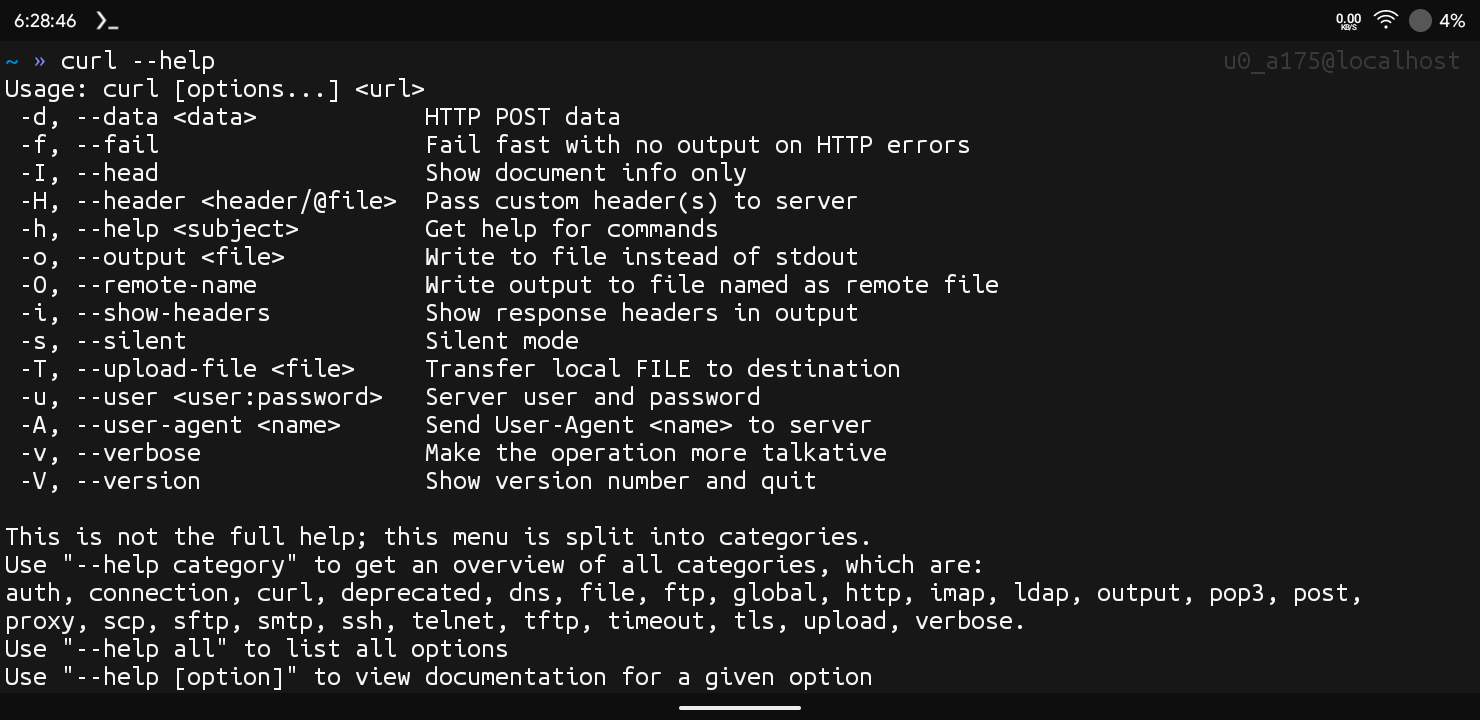
Download A File: You Can Simply Type curl -O https://example.com/file.zip Command To Download A File Using Curl In Termux. This Command Simply Downloads The File With The Orginal Name.
curl -O https://example.com/file.zipSending A Request With Custom Headers: If Once You Want To Add Custom Headers Like Authentication Tokens We Will Simply Type curl -H "Authorization: Bearer TOKEN" https://example.com/api Command To Include Them.
curl -H "Authorization: Bearer TOKEN" https://example.com/apiThese Were Some Essential Commands In Curl That Can Be Used In Termux. There Are Also Many Other Options That Can Be Used In Curl In Termux You Can Check All Of Them By Typing curl --help All Command In Termux.
Common Errors And Fixes:
Curl: Command Not Found: This Error Occurs When Curl Has Not Been Successfully Installed In Termux. We Need To Install Curl In Termux Again Using pkg install curl -y Command To Resolve The Error.if The Error Persists You May Need To Reinstall Termux From A Good Source.
pkg install curl -ySSL Certificate Problem Error: This Error Occurs When Curl Cannot Verify The Website’s Security Certificate, Often Due To An Outdated Ca Certificate Bundle In Termux. Update Your Packages Using pkg update && pkg upgrade -y To Resolve It.
pkg update && pkg upgrade -yThese Were Some Of The Common Errors That We Face While Installing And Using Curl In Termux. If You Have Any Other Error In This Process You Can Tell Me In The Comments I Will Try My Best To Help You.
Conclusion:
Curl Is One Of The Most Popular Tools For Making Web Requests In Termux And Other Linux Systems. We Have Covered A Lot Of Details, Installation And Usage Of Curl In Termux. This Was An Amazing Tool As Like As A Brother Of Wget In Termux. I Hope You Have Enjoyed Reading This Post And Understood It Well. Thanks For Reading.